Recovering dynamic disks and spanned volumes
The BMR Agent can only restore volumes to basic disks. It cannot create dynamic disks, and cannot restore volumes to dynamic disks on destination machines. You can convert basic disks to dynamic disks after starting a restored system.
Dynamic disks do not appear to be dynamic on the Plan the recovery page of the Recovery wizard. When a volume in a source system spans dynamic disks, each portion of the spanned volume appears as a separate volume with the same drive letter. When a recovery server disk has dynamic partitions, one large volume appears for all dynamic partitions on the disk.
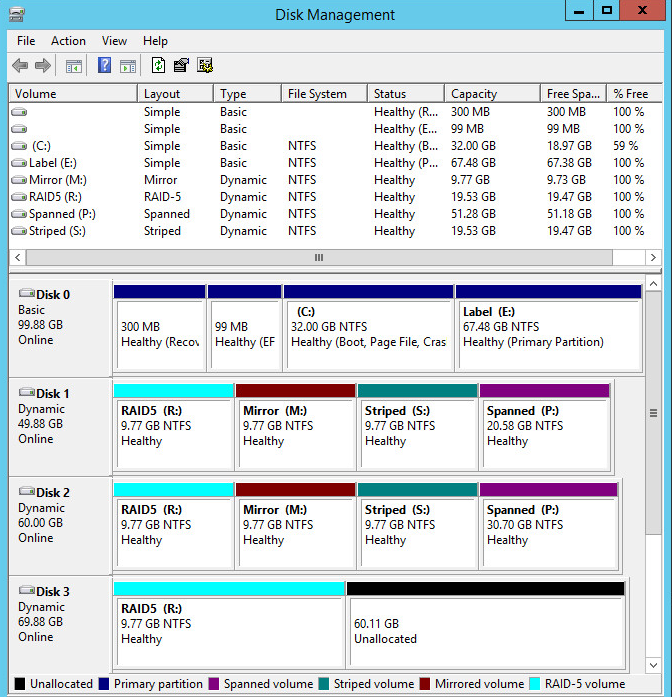
As an example, consider the system shown in the following Disk Management screen. This system has three dynamic disks (Disks 1, 2 and 3) and four volumes (R, M, S and P) that span disks.
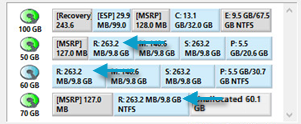
When this system is the source server, each portion of a spanned volume appears as a separate volume with the same drive letter in the BMR Agent restore wizard. For example, the R spanned volume is shown as three separate R volumes.
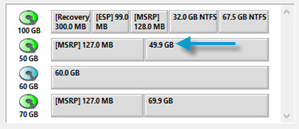
When this system is the recovery server, all dynamic partitions on a disk appear as one large volume in the BMR Agent Recovery wizard. For example, a 49.9 GB volume represents the portions of volumes R, M, S and P on Disk 1. You must delete this volume before you can restore data to the disk. Similarly, you must delete the 60.0 GB and 69.9 GB partitions before you can restore data to them.
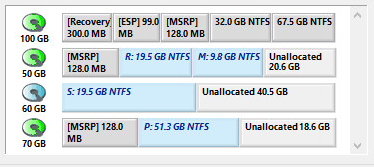
When you restore a spanned volume to a recovery server, one basic volume is created for the contents of the entire spanned volume. The volume contains as much space as the original volume, unless a volume was only partially full and can fit in the recovery server. Volumes can only be restored as simple volumes, not spanned, RAID5, mirrored or striped.
The following screenshot and table show how volumes from the sample system are restored:
|
Volume |
Original |
Restored |
|---|---|---|
|
P |
Spanned volume with two parts: 20.6 GB and 30.7 GB |
One 51.3 GB volume |
|
S |
Striped volume with two 9.8 GB parts |
One 19.5 GB volume |
|
M |
Mirrored volume with two 9.8 GB parts. Second part for mirroring only. |
One 9.8 GB volume |
|
R |
RAID5 volume. Three portions; 9.8 GB each. 2/3 of the RAID volume was used for data. The rest was used for parity. |
One 19.5 GB volume |